

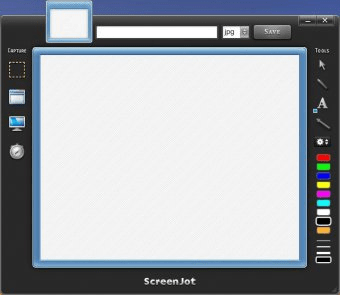
ScreenJot is yet another program for screen capture. Like most programs of the kind, SreenJot will let you capture the entire screen, top (active) window, and a custom rectangular region. Also you will be able to set the application make delayed captures, edit them, apply annotations, and share your captures' thumbnails by simply dragging & dropping them.
The program is easy to use due to its simple and attractive interface. You will only need to choose the object you want to capture, press the hotkey, edit the image and apply annotations if needed, and save it. ScreenJot allows you to rotate, flip captures, and even add torn-edge and shadow effects to them. The annotations supported by the program are callout arrows and markup pencil highlights that may be used to point out an object in your capture, and scaled text to annotate anything you want. The color of the arrows and pencil lines may be changed as well as their width, also you will be able to change the fonts.
ScreenJot is rather customizable, it allows you to adjust some general settings, change the hotkeys, captures destination folder, and more. The image formats supported by the program are not numerous: you will be able to save captures as JPG, PNG, TIF, GIF, or BMP images.


Effortlessly record your screen with audio and capture apps and live streams.









Comments